
CMS marketing is the practice of using a content management system as the working centre of your marketing, so that every page, form, offer and piece of content is published, tracked and tied back to revenue. A CMS on its own only publishes content. It becomes a marketing asset when it feeds data to your CRM, supports search visibility and gives your sales team something useful to point prospects towards.
Most established businesses already own a CMS. Few have audited whether it is helping them grow or just hosting pages. This guide covers what a marketing CMS is, which features matter, how it connects to the rest of your stack, and how to decide whether to keep, fix or replace what you have.
What is a CMS in marketing?
A CMS in marketing is software that lets your team create, edit, organise and publish digital content without developer help, while capturing the data that shows whether that content is working. Think of it as the publishing layer of your marketing system.
The technical definition is simple. The commercial definition is more useful: a marketing CMS is where prospects meet your business before they ever speak to a person. Your website, landing pages, resource library, product or service pages and lead capture forms all live in it.
A few terms get blurred, so here is how they separate:
- CMS (content management system): creates and publishes content.
- CRM (customer relationship management): stores and manages customer and prospect records and sales activity.
- Marketing automation: triggers emails, follow-ups and scoring based on behaviour.
- DXP (digital experience platform): a larger, enterprise-grade bundle that often includes a CMS plus personalisation and analytics.
These tools do different jobs. The problem starts when businesses expect one to do the work of another.
Is a CMS the same as a CRM?
No. A CMS manages content, while a CRM manages relationships and sales data. A CMS decides what a visitor sees on your website. A CRM records who that visitor is, what they have done, and where they sit in your sales process.
They work best when connected. A form on a CMS-built page should create or update a record in the CRM, tag the source, and trigger the right follow-up. When they are not connected, you get the familiar mess: marketing reports leads, sales says the leads are rubbish, and nobody can prove either claim because the data sits in two places.
Some platforms bundle both functions. That can be convenient, but bundling is not the same as connecting. A single vendor with poorly configured internals produces the same silos as two separate tools.
What does a marketing CMS actually need to do?
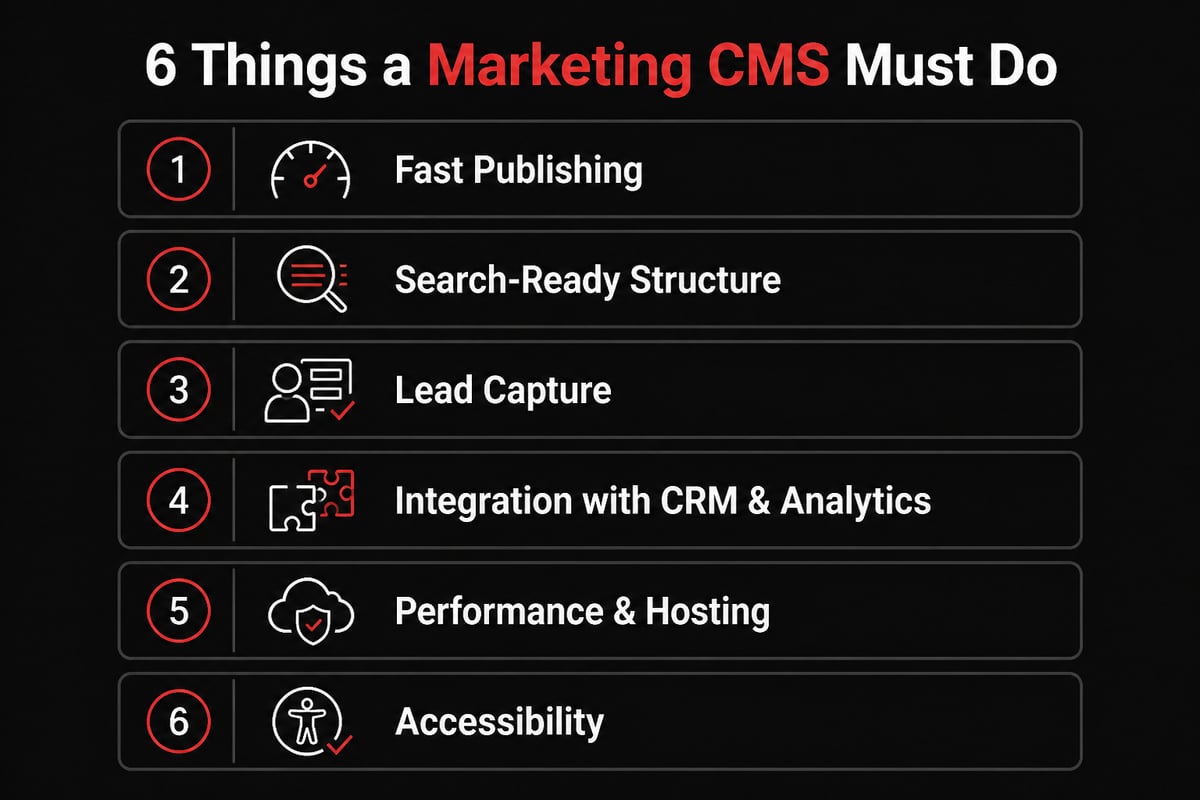
A marketing CMS needs to do six things well: publish quickly, structure content for search, capture leads cleanly, pass data to other systems, perform reliably, and remain accessible to every visitor. Everything else is a bonus.
The core requirements
- Fast, low-friction publishing. If a marketer needs a developer to change a headline, campaigns will stall. Templates, reusable components and sensible permissions matter more than a long feature list.
- Search-ready structure. Control over titles, meta descriptions, URLs, headings, redirects, sitemaps and schema. Google recommends creating people-first content and asks whether readers leave with enough information to achieve their goal. A CMS should make it easy to build pages that do that, not bury the answer under layout tricks.
- Lead capture and form handling. Forms, landing pages and calls to action that write to your CRM without manual exporting.
- Integration. Native connections or reliable APIs to your CRM, email platform, analytics, advertising pixels and sales tools.
- Performance and hosting. Slow pages lose prospects and rankings. Hosting, caching and security belong in the evaluation, not as an afterthought.
- Accessibility. WCAG 2.2 became a W3C Recommendation on 5 October 2023, with an update published on 12 December 2024. Your templates should meet it by default, because retrofitting accessibility across hundreds of pages is expensive and tedious.
Features that sound good but rarely pay off
Built-in AI writing assistants, elaborate personalisation engines and drag-and-drop page builders with endless widgets are common selling points. They are useful only if your team has the content, data and process to use them. Technology is a tool, not a trophy. A modest CMS used properly outperforms an expensive one sitting half-configured.
Which CMS platforms do marketers actually use?
Marketers commonly use WordPress, Shopify, HubSpot, Webflow, Drupal, Sitecore, Adobe Experience Manager and Salesforce-based tools, among others. WordPress is the most widely recognised example of a CMS platform, and it is the one many established businesses already run.
Rather than rank them, it helps to group them by what they suit:
| Platform type | Examples | Typically suits |
|---|---|---|
| Open-source, flexible | WordPress, Drupal | Businesses wanting control, custom builds and a large developer pool |
| Commerce-led | Shopify, Magento | Product-heavy businesses where the catalogue drives revenue |
| All-in-one marketing suites | HubSpot, Salesforce tools | Teams wanting CRM and content under one roof |
| Enterprise DXPs | Sitecore, Adobe Experience Manager, Sitefinity | Large organisations with complex governance, multiple brands and dedicated technical teams |
| Visual and design-led | Webflow | Teams prioritising design control with lighter technical overhead |
Sitecore sits in the enterprise group. It combines content management with personalisation, testing and analytics, and it suits large organisations with multi-site, multi-region needs and the staff to run it. For many mid-sized businesses it is more platform than they will ever use.
This is where being platform agnostic matters. The right CMS depends on your sales process, team capability, existing CRM and data flows. Choosing the platform first and working out the connections later is how businesses end up with a polished website that nothing else in the business talks to.
How a CMS connects to the rest of your marketing system
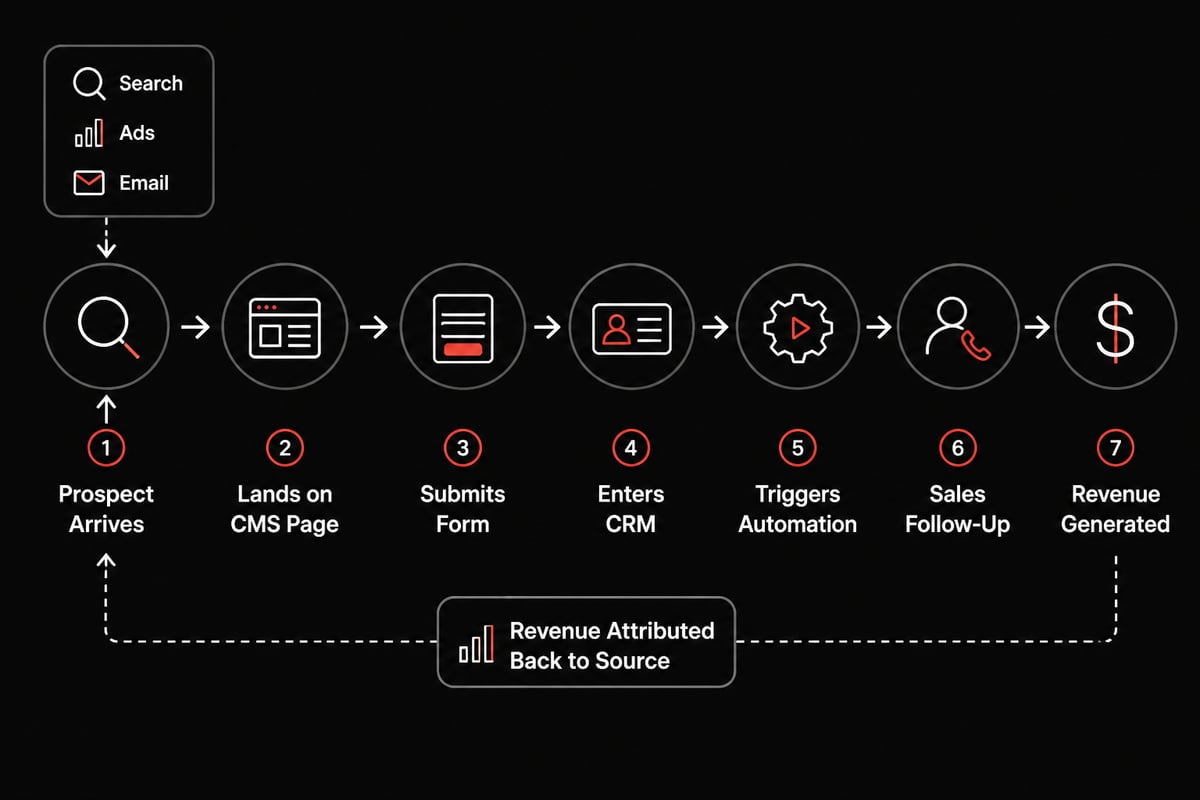
A CMS drives growth only when it is wired into your CRM, automation, analytics and sales process, so that every visit and form submission can be traced to a commercial outcome. Disconnected, it is a brochure.
Here is the flow that should exist:
- A prospect lands on a page from search, an ad or an email.
- Analytics records the source, and the CMS passes campaign parameters through to the form.
- The form creates or updates a CRM record with source, page and offer attached.
- Automation sends the right follow-up and alerts sales if the prospect meets your criteria.
- Revenue is attributed back to the original content and channel.
Each step is a point where things quietly break. UTM parameters get dropped, forms post to an inbox instead of the CRM, duplicate records pile up, and consent flags go missing. None of it is visible on the website itself.
This matters because measurement is already difficult. Attributing ROI to content and tracking customer journeys are among the common challenges B2B marketers face when measuring performance. A CMS that cannot hand clean data to the rest of your stack makes that problem worse. For larger spend decisions, tools such as Objective Platform approach the same issue from the media side with marketing mix modelling and cross-channel budget forecasting, but they still depend on tidy underlying data.
If you want to see how these pieces are built to work together, our marketing infrastructure service covers the hosting, CRM configuration, lead capture and email foundations that sit behind a CMS. It is the unglamorous layer, and it is usually the one that decides whether reporting can be trusted.
How to run an audit before you choose or change a CMS
Audit first, then decide. Most CMS problems turn out to be configuration, content or integration problems rather than platform problems, and replacing the platform leaves them intact.
Work through these questions with your marketing, sales and technical people in the same room:
- What does the CMS need to produce? Leads, enquiries, bookings, sales, retention? Name the commercial outcome per page type.
- Where does the data go? Trace one form submission from click to CRM record to sales conversation. Note every point where information is lost or retyped.
- What is the current content actually doing? Identify which pages generate enquiries, which attract traffic but convert nothing, and which nobody has visited in a year.
- How long does a routine change take? Time a simple edit and a new landing page from request to live.
- What are the technical limits? Page speed, security updates, plugin dependencies, accessibility issues, hosting stability.
- Who owns it? Unclear ownership between marketing, IT and an agency is a more common failure than the software itself.
The result is usually one of three decisions: keep and tidy, keep and rebuild the connections, or replace. Our marketing technology audit guide goes through what to assess across the wider stack if you want a structured approach.

Where AI and personalisation fit, and where they don’t
AI and personalisation features inside a CMS are worth using only when your data is clean and your content is already performing; otherwise they automate guesswork. A weak foundation with AI on top is still a weak foundation, just faster.
The evidence for caution is worth noting. Personalisation that relies on thin or inaccurate data can damage the customer experience it was meant to improve, and customers quickly notice communications that feel irrelevant or intrusive.
Sensible uses of AI in a CMS workflow include:
- Drafting first-pass summaries, meta descriptions and variations for review by a person.
- Tagging and organising large content libraries.
- Surfacing content gaps from search and enquiry data.
- Powering on-site assistance, such as a purpose-built chatbot from a provider like SynaBot, that answers common customer questions and passes qualified conversations to your CRM.
Poor uses include publishing unreviewed machine-written pages at scale and personalising on data you have not checked. Search engines and customers can both tell when a page exists to fill a gap in a content calendar rather than to help someone.
Content, search and conversion: what the CMS should support
A marketing CMS should make it straightforward to build content that ranks, answers real questions and moves a prospect to a clear next step. Traffic that does not convert is activity, not evidence of growth.
In practical terms:
- Structure pages around a single intent. One page, one primary question or task. This also prevents your own pages from competing against each other in search.
- Write self-contained answers. Open sections with a direct answer so the content can be quoted by search engines and AI assistants without losing meaning.
- Make the next step obvious. Every page type should have one defined conversion action, whether that is an enquiry, a booking or a download.
- Keep content current. Retire, merge or update thin and outdated pages instead of letting them accumulate.
- Build for sales. The best content often answers the objections your sales team hears repeatedly. If sales is not feeding questions into the content plan, the CMS is serving marketing’s assumptions rather than customers’ needs.
Content strategy and execution is a discipline of its own, and some businesses bring in specialist partners to carry it. For example, Creatiwo Agency works on content and social media marketing as a measurable growth system for Finnish-speaking markets. Our own guide to SEO in 2026 covers the search side in more depth.
Governance: the part that keeps a marketing CMS useful
Governance means clear rules about who can publish what, how content is reviewed, and when it is retired. Without it, a CMS drifts into a pile of inconsistent pages within a couple of years.
A workable minimum looks like this:
- Named owners for each section of the site.
- A simple review and approval path for regulated or high-risk content.
- A schedule to audit, update or remove pages.
- Documented naming conventions for URLs, forms and campaign tracking.
- A change log for templates, integrations and plugins.
Governance is also where organisational change tends to stall. If your business is redesigning how marketing, sales and technology teams plan and deliver together, a transformation consultancy such as Lithe works on that side of the problem. The CMS is rarely the bottleneck; handovers between teams usually are.
FAQ
What is the main benefit of CMS marketing?
The main benefit is control and measurement: your team can publish and adjust content quickly while tracking which pages produce enquiries and sales. When the CMS is connected to your CRM and analytics, you can show which content contributes to revenue rather than just traffic.
Do small and mid-sized businesses need an enterprise CMS?
Usually not. Most established businesses are better served by a well-configured mainstream platform, connected properly to their CRM and automation, than by an enterprise suite they lack the team to run. Match the platform to your sales process and internal capability.
How often should a marketing CMS be audited?
At least once a year, and again before any major redesign, migration or CRM change. Audits should cover integrations, page performance, content quality, accessibility and data flow, not just visual design.
If you want a practical first step, take one form on your website and trace a single submission through to your CRM and sales follow-up; wherever the trail goes cold is where to start. If that exercise turns up gaps, our marketing infrastructure service covers the hosting, CRM, lead capture and automation foundations that make a CMS earn its keep. At touchpoint.systems we audit what you have before recommending anything, then connect your tools into one system you can measure.