
A bigger marketing stack can create less visibility. A marketing technology audit should test more than whether each tool works on its own. It should show whether prospect and customer information moves reliably between marketing and sales, and whether teams can trust the reports they use to make decisions.
When ownership is unclear or data doesn’t line up, software can look like the problem. Sometimes it is. Often, the cause is an undefined workflow, inconsistent data handling or a broken connection between systems. Replacing a tool before finding the cause can preserve the same problem in a new interface.
This practical checklist shows what to assess across CRM, automation, data, search, conversion and sales. You’ll learn how to trace the customer journey, test system connections and distinguish a process issue from a technology gap. The aim isn’t to add more activity or collect more tools. It’s to identify what’s obstructing reliable decisions, efficient work and a connected customer experience, then decide what deserves closer investigation.
Key Takeaways
- A marketing technology audit examines how tools, data flows, connections and workflows function together, not just which software the business owns.
- Assess CRM, automation, data, search, conversion and sales against the prospect and customer journey to spot gaps between systems.
- When reports disagree, check definitions, data movement and team processes before concluding that the technology is at fault.
- Combine system records with stakeholder input to document findings, validate causes and capture their operational or commercial implications.
- Classify each finding as maintain, optimise, investigate, integrate or consider replacing. Weigh evidence, feasibility and commercial rationale before acting.
What a marketing technology audit should reveal
A marketing technology audit is an evidence-led assessment of the tools, data flows, system connections and day-to-day practices that support marketing and sales. It shows where information moves reliably, where work breaks down and whether technology supports agreed business processes and customer journeys.
The purpose is to make a sound decision, not to justify buying another platform. Findings might point to a tool that needs better configuration, a workflow that needs clearer ownership, a connection that needs repair or a process that needs redesign. Replacement is one possible decision, not the default conclusion.
A software inventory lists what the business has. An audit tests how those tools are used and what happens between them. A broad marketing audit considers areas such as strategy, positioning and campaign performance. A technology audit has a narrower focus: whether the systems underpinning those activities work together as intended. An implementation project makes changes; the audit establishes what evidence supports making them.
What belongs within a marketing technology audit?
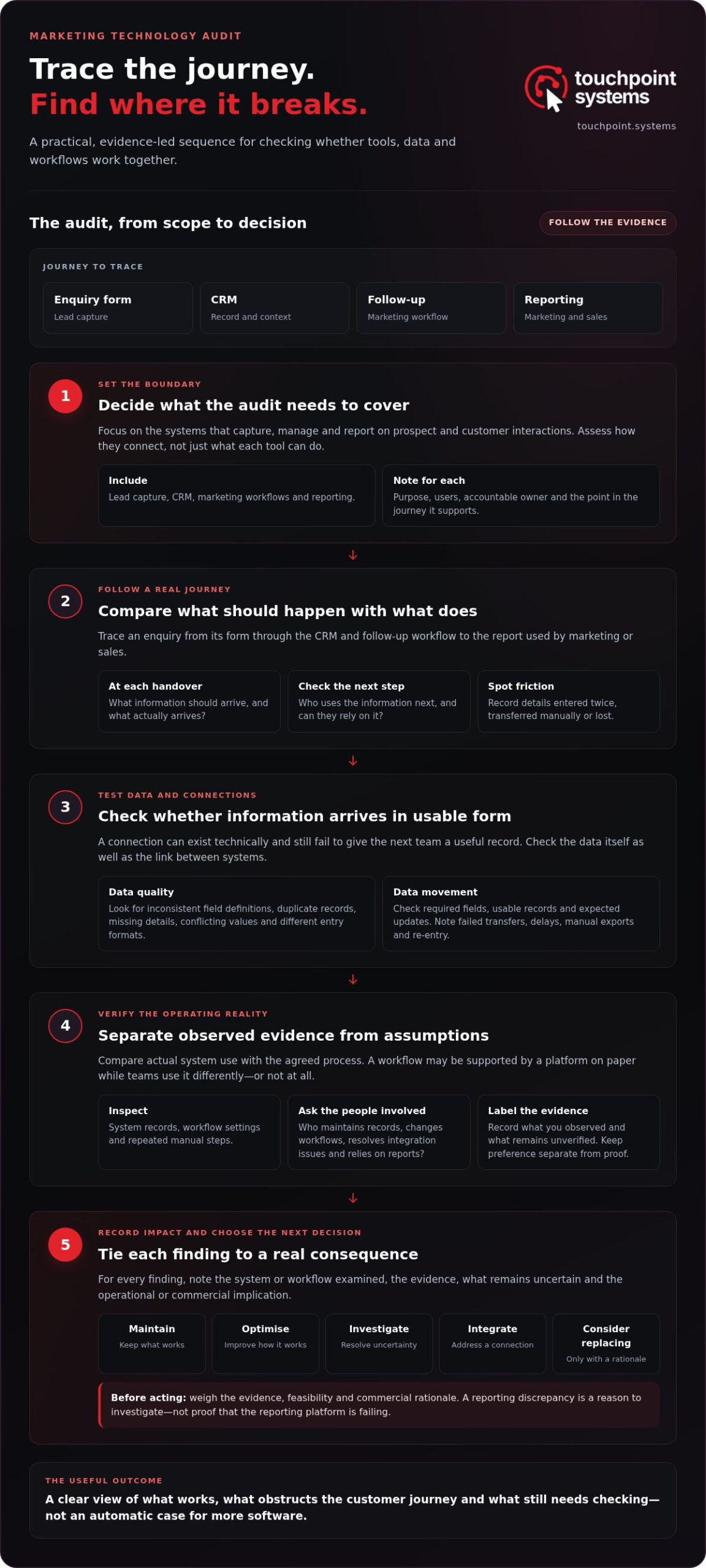
Set the scope around the systems that capture, manage and report on prospect and customer interactions. That usually includes lead capture, the CRM, marketing workflows and reporting. Assess the links between them, not just each tool’s features. Background on marketing automation platforms can help clarify the category and its relationship with systems such as CRM.
Trace a real journey through the stack. For example, follow a prospect from an enquiry form into the CRM, through any follow-up workflow and into the report used by marketing or sales. At each handover, note what information should arrive, what actually arrives and who uses it next. Record where details are entered twice, transferred manually or lost. Then compare actual system use with the agreed process. A platform may support a workflow in theory while teams use it differently, or not at all.
Include ownership in the assessment. Identify who maintains records, controls workflow changes, resolves integration issues and relies on the resulting reports. Without clear responsibility, even a technically sound connection can become unreliable in practice.
When is an audit worth considering?
Unclear tool ownership, duplicated records and reporting that teams don’t trust are reasons to investigate. So are repeated manual handovers, operational friction, a change to the stack or a planned implementation that will depend on existing systems and data.
These are warning signs, not a verdict. A reporting discrepancy, for instance, could stem from different definitions, inconsistent data entry or a broken data flow. It doesn’t prove the reporting platform is failing. Gather evidence first: compare relevant records, trace information between systems and check how the workflow is actually performed.
A useful audit leaves the business with a clearer view of what works, what obstructs the customer journey and what remains uncertain. That is enough to guide the next investigation. It is not a mandate to replace software.
Marketing technology audit checklist: what to assess
Assess the stack as a connected path through the customer journey, not a collection of software screens. Start with a prospect’s first interaction and follow the information and decisions that carry through to sales, service and reporting. A useful marketing technology audit assesses technology alongside the operational context that determines how people use it.
For each finding, separate what you can observe from what you suspect. A system record, workflow setting or repeated manual step is evidence. “The platform is clunky” is a judgement. Vendor claims can suggest a capability to test, but they don’t prove that it works in your environment. Forbes offers a useful perspective on evaluating your marketing technology stack, including workflows and integrations.
Assess tools, data and system connections
Map each relevant tool to its role in the journey. Include its purpose, users, accountable owner and the point at which it supports a prospect or customer. Then trace what information enters, leaves or should pass between systems. For each connection, check whether the receiving system gets the required fields in a usable form and whether updates flow as expected. A connection may exist technically but still fail to deliver a useful record to the next team.
- Tools: Record the purpose of each lead capture, CRM, automation and reporting tool. Note which teams rely on it and what decision or customer interaction it supports.
- Data: Check whether key fields use consistent definitions. Look for duplicate records, missing details and conflicting values that could distort segmentation or sales follow-up. Check whether teams enter the same information in different formats.
- Connections: Trace how information moves between systems. Note failed transfers, delayed updates, manual exports and re-entry, then identify where these affect visibility or add work.
- Journey impact: Connect each issue to a real consequence, such as a sales team lacking context for an enquiry or marketing reporting that cannot be reconciled with sales activity.
Record the evidence beside each finding: which system or workflow you examined, what you observed and what remains unverified. Keep preference separate. A team may dislike a tool without it being structurally inadequate; a familiar tool may still be producing unreliable information.
Assess workflows, ownership and adoption
Compare the documented process with what teams actually do. Follow how an enquiry is assigned, updated and acted on, including workarounds that happen outside the system. Then identify who owns data quality, access, maintenance and decisions about workflow changes. Without clear responsibility, a reliable process can drift, and a useful capability can go unused.
- Check whether teams follow the agreed steps consistently or have developed separate methods.
- Confirm that field definitions and handover expectations are understood by the people who use them.
- Assess whether system capabilities serve a defined purpose, rather than existing because a vendor made them available.
Use the findings to focus the next investigation, not to justify a predetermined purchase. If evidence points to unclear roles or inconsistent practice, address that operational gap before changing platforms. Where the assessment needs structured review, touchpoint.systems’ Audit & Feasibility assessment examines existing systems, data flows and friction alongside technical viability and commercial rationale.
How to distinguish a stack weakness from a symptom
A visible problem is a starting point, not a diagnosis. The same symptom can have different causes: a reporting gap may reflect inconsistent definitions, missing data between systems or a process that teams don’t follow. A marketing technology audit tests the case for change; it doesn’t assume the platform is at fault.
Validate the evidence and operational impact before recommending action. Trace the issue through the system and the work people do around it. Then record what you know, what you suspect and what remains unanswered.
Trace the possible causes behind visible issues
Use symptoms to guide investigation, not to jump to a fix. For duplicate records, examine how details are captured, whether connected systems apply consistent matching rules and who is responsible for record quality. For slow follow-up, trace the handover from enquiry to sales. The delay could relate to workflow design, unclear responsibility or how teams use the system. These are diagnostic possibilities, not universal explanations.
A reporting discrepancy needs the same discipline. Check whether teams define a lead, conversion or reporting period consistently. Then compare source records with what passes between systems and what appears in the report. If the underlying records differ, the dashboard may be accurately displaying inconsistent inputs. Replacing the reporting tool would miss the cause.
Prioritise findings by confidence and consequence
Assess two things separately: how strong the evidence is and how much the issue could affect operations or the customer journey. A verified break in an enquiry handover may warrant attention; an untested concern about a tool may need more investigation first. Don’t confuse a dramatic complaint with a material system failure.
The table below shows how to turn an observation into a testable finding. The possible causes are prompts for investigation, not conclusions.
| Observed symptom | Possible cause | Evidence needed | Business consequence |
|---|---|---|---|
| Duplicate prospect records | Capture rules, system connections or unclear ownership | Compare records across entry points and review matching and update processes | Teams may act on incomplete or conflicting information |
| Slow enquiry follow-up | Handover gaps, workflow design or inconsistent system use | Trace enquiry timestamps, assignment steps and actual team practice | Prospects may wait longer for a response |
| Marketing and sales reports disagree | Different definitions, data flows or recording practices | Compare definitions, source records and reporting inputs | Decisions may rely on figures that cannot be reconciled |
Before proposing a response, record dependencies and open questions. A finding may depend on another team’s process, a data field used by several workflows or a connection whose behaviour hasn’t been tested. Rank the issue by confidence and consequence, then investigate gaps that could change the recommendation. The result is a reasoned decision: maintain, investigate, improve a process or consider a technology change. Not a replacement decision dressed up as diagnosis.
How to document marketing technology audit findings
Good documentation makes an assessment useful to people who weren’t present for every system review or stakeholder conversation. It should show what was examined, what the evidence supports, what the issue affects and what still needs checking. Keep observations distinct from recommendations. The record should support a decision, not make an untested fix look inevitable.
Scope depends on stack complexity, access to relevant evidence and the needs of stakeholders. Start with the decision the business needs to make, then gather enough information to assess it. A wide inventory isn’t automatically a thorough audit; more records are useful only if they answer the question.
- Set the decision and boundaries. State what the assessment needs to inform, such as whether a current workflow can support a planned change. Name the journey, systems, teams and reporting in scope. Record what’s excluded so readers don’t mistake a focused assessment for a review of the whole business.
- Collect the working evidence. Bring together the tool inventory, process documentation, available system records and relevant access information. Note where each item came from and when it was reviewed. System records show what the technology registered; they don’t necessarily explain why a team took a particular action.
- Speak with the people who run the workflow. Ask workflow owners to describe how work moves in practice, including exceptions and manual steps. Compare their account with the documented process and system activity. Record differences as questions to validate, not proof that either the records or the team’s account is wrong.
- Trace selected journey examples. Follow relevant prospect or customer examples across the tools and handovers in scope. Check what was recorded, what passed between systems and what the next team could see. Use stakeholder input to explain context, and system evidence to verify recorded activity. Neither alone describes the full workflow.
- Validate and write up each finding. Record the evidence, the operational impact, your confidence in the conclusion and any unresolved questions. Separate a process question, such as unclear responsibility for an enquiry, from an issue that needs technical feasibility assessment, such as whether a system connection can support the required data flow.
Make findings easy to act on
Write each finding so a decision-maker can understand it without reconstructing the investigation. State the observed condition, the supporting evidence and the consequence for the prospect or customer journey, team effort or reporting. Then note what response the evidence may support, without presenting it as a settled decision if key questions remain.
Keep the record concise and traceable. Link claims to the relevant system record, process document or stakeholder input, and identify where evidence conflicts or access was limited. That gives the next reviewer a clear route to verify the conclusion rather than relying on a summary stripped of context.
When findings call for a structured assessment of system evidence, data flows and technical feasibility, touchpoint.systems’ Audit & Feasibility service can help establish what the evidence supports before implementation decisions are made.
Use audit findings to guide the next decision
Findings become useful when they lead to a proportionate decision. Don’t treat every gap as a project or every unused feature as waste. Classify what should happen next, name who owns that decision and set out what would justify moving it forward.
Turn documented findings into decision options
Use five practical categories to keep recommendations clear:
- Maintain: Keep an effective tool or process in place and monitor it.
- Optimise: Improve configuration, guidance or day-to-day use.
- Investigate: Gather missing information before choosing a response.
- Integrate: Address a verified gap between systems where a connection serves a defined need.
- Consider replacing: Assess alternatives if the current tool cannot meet a demonstrated requirement.
Prioritise by operational impact, confidence in the finding, dependencies and effort to resolve it. A process clarification may be enough where responsibilities are unclear. A technical change may be justified where a verified limitation blocks an agreed way of working. Keep those paths distinct; software shouldn’t be the default answer to a management question.
Use a roadmap to show sequence, ownership and decision points. It helps teams coordinate and revisit assumptions. It doesn’t guarantee outcomes or require every recommendation to proceed.
Assess feasibility before implementation
Before committing, establish what must change, who will be affected and what conditions need to hold for the change to work. Consider operational fit alongside technical dependencies. If a key assumption is unresolved, make the next step a focused investigation rather than an implementation commitment.
touchpoint.systems’ Audit & Feasibility work helps established businesses assess these decisions before moving into implementation. Explore an evidence-led audit approach to see how a structured assessment can inform the next step.
The useful takeaway is simple: choose the smallest justified next step, assign an owner and define what evidence will show whether it was appropriate. Progress should follow the diagnosis, not outrun it.
Make the next move with evidence
The value of a review is what changes afterwards. Give each agreed action an owner, a clear reason and a point at which the business will check whether the change addressed the issue. That keeps decisions accountable without mistaking implementation activity for progress.
For decisions that affect several teams or customer touchpoints, make dependencies visible before work begins. A change to one workflow can alter what another team sees or records. Agree how those effects will be checked, and keep the original evidence available for comparison.
A marketing technology audit is useful when it improves the next decision, even if that decision is to hold steady. If you’re ready to assess your connected growth systems, explore touchpoint.systems. Start with the question that matters to the business, then let the evidence set the pace.
Frequently Asked Questions
What is the difference between a marketing technology audit and a marketing audit?
A marketing technology audit is useful when the decision depends on how systems support work; a broader marketing audit is needed when the question also involves market position, strategy or campaign direction. If enquiry numbers look weak, for example, first establish whether capture and attribution are dependable before drawing conclusions about campaign performance. The two reviews can inform each other, but keeping their findings distinct prevents technical uncertainty from being mistaken for a strategic conclusion.
Can a marketing technology audit be useful if the business has only a few tools?
Yes. A small number of tools can still create dependency risks. Check whether critical settings or access are controlled by one person, and whether the business could maintain essential operations if that person were unavailable. Note who can make changes, where system knowledge is recorded and which tasks depend on that access. This kind of review can identify resilience gaps even when the stack itself is simple.
How often should a business conduct a marketing technology audit?
There’s no universal interval. Instead of scheduling a full review by default, keep a record of material system and process changes, then decide whether they affect earlier findings. A targeted follow-up may be enough after a change to an enquiry route or reporting definition. Set review conditions when documenting the original assessment, such as which changes would make its assumptions or recommendations out of date.
What happens if an audit finds incomplete or inconsistent data?
Make the limitation visible in any analysis that relies on the affected data. In particular, distinguish a genuine zero from a missing or unknown value; treating them as equivalent can distort comparisons. Record which fields and reporting periods are affected, and avoid drawing conclusions that depend on unverified records. This lets decision-makers use reliable information while keeping the limits of the analysis clear.
Who should take part in a marketing technology audit?
Keep participation focused on the decision at hand. Identify a person who can approve operational changes, someone who understands system configuration and a representative of the team whose work is affected. Agree who can validate each type of finding and who makes the final decision. This avoids broad, unfocused workshops and makes it clear where unresolved questions should go before recommendations are accepted.
How do you decide whether a marketing tool is underused?
Before considering a change, identify what would depend on the tool if it were unavailable. Check whether other systems consume its outputs, whether it holds records the business needs to retain and whether a task would move elsewhere. These dependencies can matter more than how often people interact with the interface. A usage review should account for the tool’s role in the wider operating setup, not just visible activity.